


My Sticker Room - Decor Game
4.31.73K Reviews
App Specs
- Version
- 1.5.5
- Updated On
- License
- Free
- Downloads
- 10,000,000+
- Developer
- SayGames Ltd
- Categories
- Simulation
- Platform
- Android
Screenshots
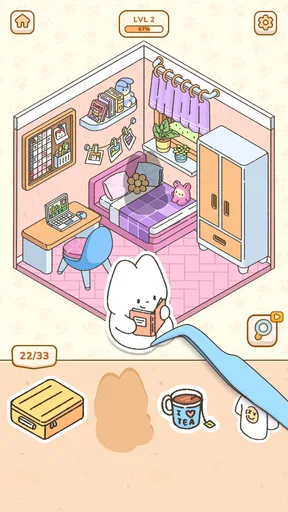
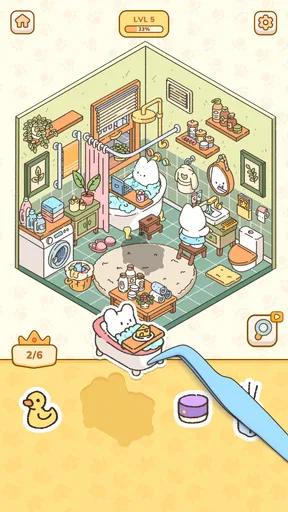
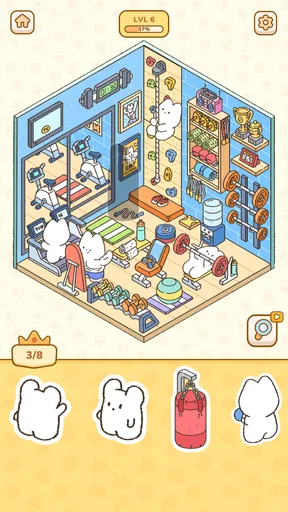
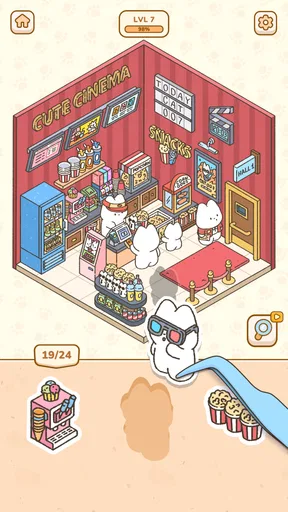
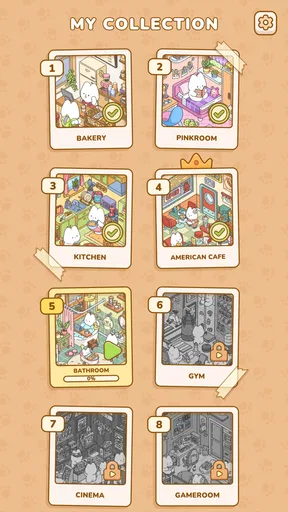
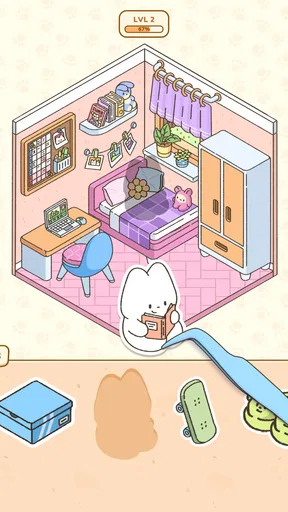
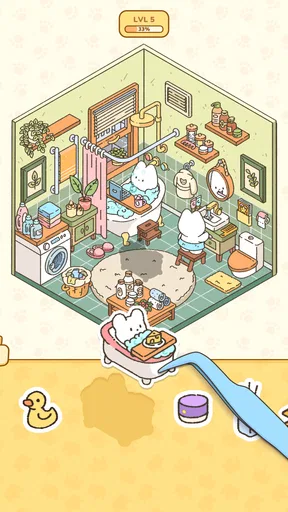
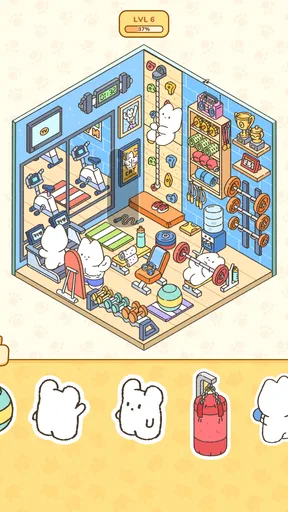
 Analysis by AppCompare
I tend to reach for My Sticker Room - Decor Game when I want a small creative break rather than a demanding game to master. It turns room decorating into a sticker-based activity: instead of measuring furniture or following a strict renovation plan, I arrange visual pieces and see how they work together. That makes it approachable when I have only a few minutes, though it also means the appeal depends on enjoying experimentation more than on completing a deep simulation.
Quick sessions and the pace of decorating
The basic idea is easy to grasp: start with a room and build its look by placing decorative items. I like that the focus is on visual choices rather than on learning a long list of controls. If you have ever rearranged a room in a drawing app or made a collage, the central activity should feel familiar. You can try a layout, decide it feels crowded, and adjust the composition without having to plan a real purchase or move heavy furniture.
That quick entry is useful for a short pause during the day. I would open it while waiting for something, choose a few pieces, and leave the room in a state I could revisit later. It does not require the sort of sustained attention I expect from a strategy game, and its gentle subject matter suits people who want a calmer alternative to action-focused play. The trade-off is that players looking for goals, a story, or complex systems may find the decorating loop too open-ended.
I would not assume every session will feel equally brisk. The speed of placing stickers is only one part of the experience; choosing a direction can take longer than moving an item. I find it helps to decide on a mood first—bright and playful, quiet and leafy, or tidy and modern—then select pieces that support it. This small constraint makes browsing feel purposeful and can keep a room from becoming a pile of unrelated decorations.
Making a room feel intentional
The freedom to combine furniture, plants, wall art, and pets is the main creative draw. In a sticker-based room, scale and placement do much of the work: one large piece can anchor the scene, while smaller accents make the remaining space feel considered. I would begin with the biggest visual elements, then use plants or wall details to balance empty areas. It is a more satisfying workflow than placing every attractive sticker as soon as I see it.
Layering gives that process extra room for personality. When items overlap, the result can feel less like a flat inventory display and more like a lived-in corner. Still, layering can also make a design hard to read if too many pieces compete in the same area. My practical tip is to step back from adding more once the main shape of the room is clear. A little empty space can make favorite stickers stand out, especially when the scene already has several strong colors or patterns.
Resizing and rotating stickers are useful for adjusting the composition rather than accepting every item at its default angle or scale. I would use those controls sparingly: a slight change can help an object fit a particular gap, but repeated resizing may make neighboring objects feel mismatched. When I am trying a new style, I prefer to change one or two pieces at a time. That makes it easier to see which adjustment helped and gives the room a more coherent look.
Worth Reading Before You Choose

Baby Panda World Brings Quick Play to Modern Phones, but Its Game Library Feels Busy

ESPN’s Live Game View Makes Following Close Games Easier

QuizzLand Review: A Good Fit for Short Trivia Breaks, Not Every Player

Basketball Stars: Multiplayer Is Fast, but Can It Recover When Matches Go Wrong?

WEBTOON Turns Phone Updates Into a Better Reading Routine

Link to Windows Runs on Shared Habits, Not Social Feeds
Unleashing Your Inner Decorator
When I first opened My Sticker Room - Decor Game, I was immediately hooked. The interface is super friendly, making it easy to dive right into decorating. You start with a blank canvas—a simple room that’s just waiting to be transformed into your personal masterpiece.
The app is packed with a variety of stickers, ranging from furniture and plants to quirky wall art and adorable pets. It’s like having a digital scrapbook where you can mix and match items to your heart’s content. And trust me, the options are endless! Whether you’re going for a cozy bohemian vibe or a sleek modern look, there’s something for everyone.
Features That Keep You Hooked
One of the standout features is the ability to layer stickers. It adds depth and personality to your room, making it feel more alive. I found myself spending hours just experimenting with different layouts. Plus, the app includes a nifty feature that lets you resize and rotate stickers, giving you complete control over your masterpiece.
Another aspect I absolutely love is the community feature. You can share your creations with friends or browse through others’ designs for some inspiration. It’s like having a mini Pinterest board right inside the app. And let's be honest, who doesn’t love a bit of friendly competition?
Inspiration, sharing, and reasons to return
The community side is most helpful when I have run out of ideas, not when I am trying to make the room look like someone else’s. Browsing other designs can show how a sticker works in a different arrangement, or suggest a color combination I would not have considered. I would treat those examples as prompts rather than templates: copying a whole room can take the fun out of making choices, while borrowing one small idea gives me a starting point of my own.
Sharing also changes what I pay attention to. A room that looks appealing while I am editing it may be harder to read at a glance, so before showing it to someone I would simplify crowded areas and check that the main feature is obvious. That is a useful little design exercise even if I never post anything. Players who prefer a private, self-contained activity can still enjoy the decorating itself, but the social element will matter less to them.
The game is updated regularly with new sticker packs, so there’s always something fresh to explore. The developers seem to have a great sense of what users want and keep supplying us with trendy and seasonal stickers. It keeps the game feeling fresh and exciting every time you open it.
Sticker variety is valuable because it can change the direction of a room, but more options are not automatically better for every session. A large choice can slow me down when I have no clear plan. I get more from a new set when I use it to solve a specific design problem—adding a focal point, making a corner feel less bare, or giving a room a different mood—rather than trying to use every new piece at once.
Who will enjoy this style of play?
I think this game is a good fit for people who enjoy interior design as a visual hobby but do not want the pressure of planning a real renovation. It can also suit younger players who like arranging cute objects and anyone who prefers creative play to winning or losing. The age rating is Everyone, which matches the light, accessible premise; parents should still make their own decisions about any app their child uses, including its social features and purchases.
It is less likely to satisfy someone who wants a realistic home-design simulator with measurements, budgets, practical layouts, or detailed construction decisions. It is also not my first choice for a player who needs a strong sequence of missions to stay engaged. Compared with building games that ask you to manage resources or progress through objectives, this one puts the emphasis on arranging a scene. Compared with a general-purpose collage or drawing app, its room theme gives the activity a clearer focus, but it is not a substitute for a full design tool.
A realistic way to use it is to open it after school or work, choose one small area to improve, and stop once that corner feels balanced. That keeps a relaxing session from turning into endless tweaking. Another approach is to make two contrasting versions of a room in separate sessions: one calm and sparse, another colorful and layered. The point is not to prove which is correct, but to notice how a few changes in color, scale, and spacing alter the feeling of the space.
Stability, device expectations, and spending
I would describe the experience as light in concept, but I would not take that as a promise about performance on every phone. Device age, available storage, background activity, and the current app build can all affect how smoothly any mobile game behaves. If the interface feels sluggish, closing other demanding apps and restarting the game are sensible first steps. If an update changes how it runs, checking that the installed version is current may also help. I would avoid keeping a very long decorating session open if the device is already warm or low on battery.
The game is free to download, and optional in-app purchases range from $1.99 to $49.99 per item. I would decide before playing whether I am happy to stick with the free experience, then treat any purchase as a deliberate choice rather than a shortcut to make a room feel complete. The core activity is about arranging what is available; a satisfying composition does not need to use every possible sticker. That mindset helps keep a casual decorating game casual.
SayGames Ltd is the developer, and the game is listed as a simulation title. It has a 4.6 average from around 42,000 ratings and more than 10 million installs, which suggests that its simple decorating premise has found a broad audience. The current version is 1.3.1, it was released on March 27, 2025, and it requires Android 8.0 or later. Those details make it easier to judge basic compatibility, but they do not guarantee identical speed or stability across devices.
For recovery from a hiccup, I would first close and reopen the app and check whether the issue happens again before making bigger changes. If I cared about a particular room, I would be cautious about clearing app data or reinstalling without knowing how my progress is handled; losing a design would be more frustrating than taking a break and trying again later. That is a general precaution for creative games where the work itself is the reward, not a claim that this game has a particular backup system.
A calm creative break, with a clear limit
Also, the app is surprisingly therapeutic. After a long day, there’s something incredibly calming about zoning out and focusing on creating a beautiful space. It’s like a mini escape where you can let your creativity flow freely without any rules.
That calm is strongest when I treat the room as a small composition rather than a project that has to be perfect. I would recommend it to a friend who likes cute decor, enjoys trying visual combinations, or wants a low-pressure activity to dip into between other things. I would steer a friend toward a more structured building or design game if they wanted a clear progression system, realistic planning, or a challenge that keeps escalating.
In conclusion, My Sticker Room - Decor Game is a delightful app that blends creativity with a sense of community. It’s perfect for anyone who loves design, creativity, or just needs a fun way to unwind. So, go ahead and download it—you might find yourself becoming the next virtual interior design superstar!
Pros
- Creative outlet with endless decor options.
- User-friendly interface for easy navigation.
- Frequent updates with fresh content.
- Offline mode available for uninterrupted play.
- Engaging community for sharing designs.
Cons
- Limited free items; in-app purchases push.
- Occasional glitches with item placement.
- Ads can disrupt gameplay experience.
- Requires significant storage space.
- Customization options can be overwhelming.
FAQs for My Sticker Room - Decor Game
What is My Sticker Room - Decor Game about?
My Sticker Room - Decor Game is a fun and engaging app that lets users design and personalize virtual rooms using a variety of stickers and decor items. It combines creativity with gameplay, allowing players to express their interior design skills in a virtual environment. The app is available on both Android and iOS platforms.
Is My Sticker Room - Decor Game free to play?
Yes, My Sticker Room - Decor Game is free to download and play. However, it offers in-app purchases for additional stickers, decor packs, and other premium features. While the basic version provides a lot of content, purchases can enhance the gameplay experience by unlocking exclusive items.
What age group is suitable for My Sticker Room - Decor Game?
My Sticker Room - Decor Game is suitable for a wide range of age groups, typically from children aged 4 and up to adults. Its user-friendly interface and playful design make it particularly appealing to younger audiences. However, creative adults may also find enjoyment in customizing virtual spaces.
Does My Sticker Room - Decor Game require an internet connection?
While My Sticker Room - Decor Game can be played offline, an internet connection is needed to access certain features such as downloading new sticker packs, participating in community challenges, and syncing progress across devices. Playing offline limits some functionalities, but the core gameplay remains accessible.
Can I save and share my designs in My Sticker Room - Decor Game?
Yes, the app allows you to save your room designs within your device. Additionally, you can share your creations with friends and other players through social media platforms directly from the app. This feature encourages a community feel, where users can showcase their creativity and gain inspiration from others.


